Nothing too complicated — we just need to make sure you are the real owner of this landing page or a site, and that’s it. In fact, we don’t even do it manually: the process is automated and thus pretty quick.
But what if you had some issues?
We spoke to our customer support managers and found out all possible cases when your landing page or a website might not pass this verification.
Haven’t found your problem in this post?
It’s pretty unlikely, but we are here to help: you can always contact us at support@propush.me.
So, what are the possible issues?
So you did everything correctly, but your verification request was denied. Before you start looking for a mistake in some advanced settings, check if your site or landing page meets our requirements.
They are very simple, so here is a checklist:
ProPush suggests two ways how to verify that you own your website or landing page:
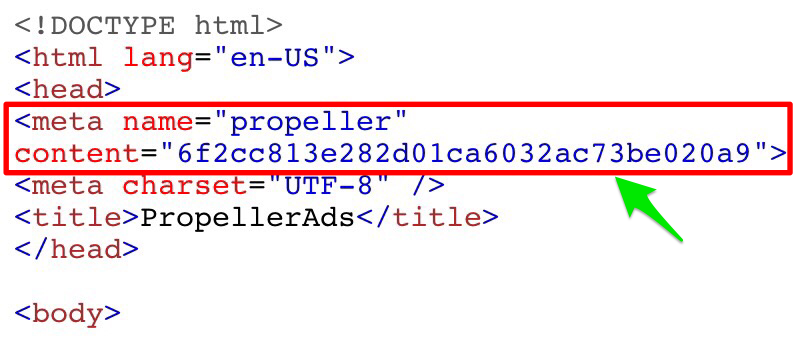
Option 1 (Recommended). Add your website URL to a special field in your account, and copy a verification code that you will find below. Copy this code, and go to your site’s source code.
You need to place the code between the <head> and </head> tags. A very common mistake is the wrong code placement — so here is an example of how it should look when you did things right:
Option 2. We consider this one as an alternative — and, by the way, it usually causes more mistakes than code verification. So, here you need to download a verification HTML file and add it to your site’s root directory.
Nothing difficult, but here are two very important nuances that can spoil the whole deal:
Sometimes, in very rare cases, there might be a technical issue on the ProPush side. In this case, we will check if you did everything correctly, and verify your source manually.
As you see, not so many things can go wrong — so we look forward to you join ProPush!