Today, we’re looking at yet another example of how mindful scaling, the right tools, and a clear strategy can deliver a seriously solid result.
This time, it started with a modest ad budget. Still early in their journey with the ProPush Constructor, the publisher sent Facebook traffic to Constructor-built landing pages and earned $1,581 while maintaining a strong ROI. It’s a promising start with plenty of room to grow.
Keep reading to discover our publisher’s winning strategy, the creatives that worked, the optimization steps he took, and some genuinely useful tips for getting the most out of the Constructor.
But first, here’s a quick overview of what we’re dealing with today:
Here is how he described it himself:
"Over the past three months, I have been testing and optimizing Facebook traffic with ProPush.me's Constructor to find combinations of traffic sources, GEOs, creatives, and campaign settings that could consistently generate revenue."
As our publisher explains, it’s all about the speed of the feedback loop:
"I focused on using Facebook because it provides the ability to test different audiences and creatives quickly and scale campaigns when I find a combination that performs well."
Another reason was the mindset Facebook audience was in – it perfectly matched the Constructor’s Social Survey template he chose.
Facebook traffic is curiosity traffic: people scroll, something attracts them, they tap to find out what it was, and the Social Survey flow then asks a few light social questions that a curious visitor will answer without a second thought.
The offer page also gave him a clear idea of how to approach creatives:
"Social Survey Constructor tends to make sure users interact with social-related questions, and since the offer page contains questions about the user's age, gender, and relationship status, this gave me an idea of the style of creatives that will likely perform."
We’ll come back to the creatives shortly. But first, let’s take a look at his campaign targeting.
The GEOs our publisher decided to focus on were Mozambique and Rwanda.
That doesn’t mean he didn’t test anything else, but those two consistently kept contributing the bulk of both traffic and revenue, so that is where the budget went.
His campaigns targeted Android and iOS users together, with an average CPM of around $6 throughout the period.
So, that $6 CPM became his key benchmark. For example, with RevShare, the rule is simple: the flow needs to earn more than the traffic costs. This helped him determine the maximum he could afford to pay for each result before launching a campaign.
Now that we’ve covered the GEOs, let’s dive into our publisher’s creative strategy:
"I usually use non-explicit female-focused ad concepts, taking inspiration from the type of content and topics that people already interact with on social media platforms such as Facebook and Pinterest. The main idea is to make the creative captivating and create enough curiosity for the user to click and engage. This is important because the quality of the traffic also affects the cost per result."
Here are a few rules he recommends following:
Strong creatives didn’t just improve the click-through rate. More than that: they also helped lower the cost of traffic.
In his best-performing campaigns, the cost per landing page view dropped to around ₦5 (about $0.003), though it varied considerably by GEO, audience, campaign, and creative.


The screenshots are provided by the publisher
Our publisher shared a detailed breakdown of every step: from the initial campaign setup to optimization and scaling. So, let’s take a closer look at how he structured the process and turned early test results into consistently profitable campaigns.
When launching a new campaign, the publisher didn’t go all-in from day one. Testing the waters with a small budget seemed like a much more sensible approach:
"Starting with a small budget allows me to limit the initial risk while Meta gathers data and optimizes the ad set during the learning phase, which normally takes around 2–3 days. Since the average eCPM on the affiliate network is around $6, I need to maintain a low CPR in order to stay profitable. Spending too much on a newly created ad set can increase the traffic cost before I know whether the combination will work."
Even with this comparatively modest budget, he could get through the unpredictable first few days without overspending, and still collect enough data to judge whether the combination had potential.
As he put it, "the objective at this stage was not immediately to maximize revenue."
Instead, the budget was there to answer a few simple questions:
In other words, the initial $3 cap was not a test of whether the Constructor could generate a profit. It was simply a way to keep spending under control during the first few days while checking the campaign for setup or tracking issues. Any conclusions about revenue potential would come later, after the campaign had collected enough traffic and data.
"After creating my campaigns, I usually leave it for about 8 to 12 hours, which is half of the day, in order to fast-track the performance. During this period, I usually use Ads Manager to check the click-through rate, the landing page views generated, the impressions accumulated on my affiliate network and also the initial CPM. The early check is to decide if the creatives used will perform well in the long run and also bring profit, since the earning mode is revshare. And since the early campaign always has a high CPR, no further changes are made with ads that have a good click-through rate between 18% or above for the next 48 hours."
Two details here are especially important:
This gives Meta enough time to optimize while preventing promising ads from being switched off too early.
"I normally start each campaign with a single ad set and monitor it for around 8–12 hours, or sometimes 24 hours depending on the amount of data coming in. If an ad set is clearly underperforming, I stop it. The ones that perform well are allowed to run for another 2–3 days without making unnecessary changes. This gives the ad set time to go through the learning phase and stabilize before I consider scaling it."
Leaving the best-performing creatives alone is where many advertisers struggle. Editing a live ad set can push it back into the learning phase, so tweaking a promising setup on day one may undo the stabilization you’ve already paid for.
There’s another important number in his answer: one that should shape your testing budget:
"Typically, I test around 3–5 ad sets before identifying a combination that I consider profitable enough to scale."
In other words, don’t budget for a single launch. Plan for around four tests before expecting to find a combination worth scaling.
"I normally allow an ad set to reach around $15–$20 in ad spend before making a scaling decision. This gives me enough information to see whether the CPR is stable and whether the ad set can continue performing profitably."
For him, the green light for scaling is a CPR of around $0.00323 – the ₦5-or-less benchmark from his own reporting:
"After 2–3 days, when I see a CPR of around $0.00323 (approximately ₦5 or less in my results), this gives me enough margin to start scaling. At that point, I normally increase the ad set budget by around 20–30% while monitoring the CPR and overall performance."
Then comes the question of direction. He can scale horizontally by duplicating an ad set that already works, or vertically by increasing its budget with a bid cap:
"Both methods work, but duplicating an already performing ad set within the same campaign can be easier without interrupting the initial CPR or performance, and this works better in my own case. I usually test new creatives when duplicating an ad set within the same campaign. Also, I always duplicate a winning ad set not more than two times to avoid audience fragmentation."
The key here is not to overdo it: he stops at two duplicates. Any more than that, and the ad sets may start competing for the same audience, pushing performance in the wrong direction.
His entire process, in one neat loop:
A working creative can stop being a working creative overnight for reasons that have nothing to do with its performance, and his answer was to always have the next one ready:
"Facebook can also be challenging because advertisements may sometimes be rejected or become unavailable. When this happened, I worked on creating or modifying alternative creatives so that I could continue testing and maintaining traffic flow while staying within the platform's advertising requirements."
He’s referring to Meta’s Advertising Standards, which are definitely worth checking before you build a creative, not after it gets pulled.
Optimization wasn’t something he did on a fixed schedule. As he put it, "when I found an ad set performing better than the others, I used it as a basis for further testing." The stronger ad sets shaped the next round of tests, while weaker creatives were removed before they quietly ate through the budget. Then the cycle started again.
Over roughly 3 months, the campaigns produced $1,581.81 in ProPush earnings at an average CPM of $6.087.
June was the standout month, bringing in $818.62 at a $6.988 CPM. Since the CPM was also above the campaign average, June’s result wasn’t just about traffic volume – the traffic itself was paying better.
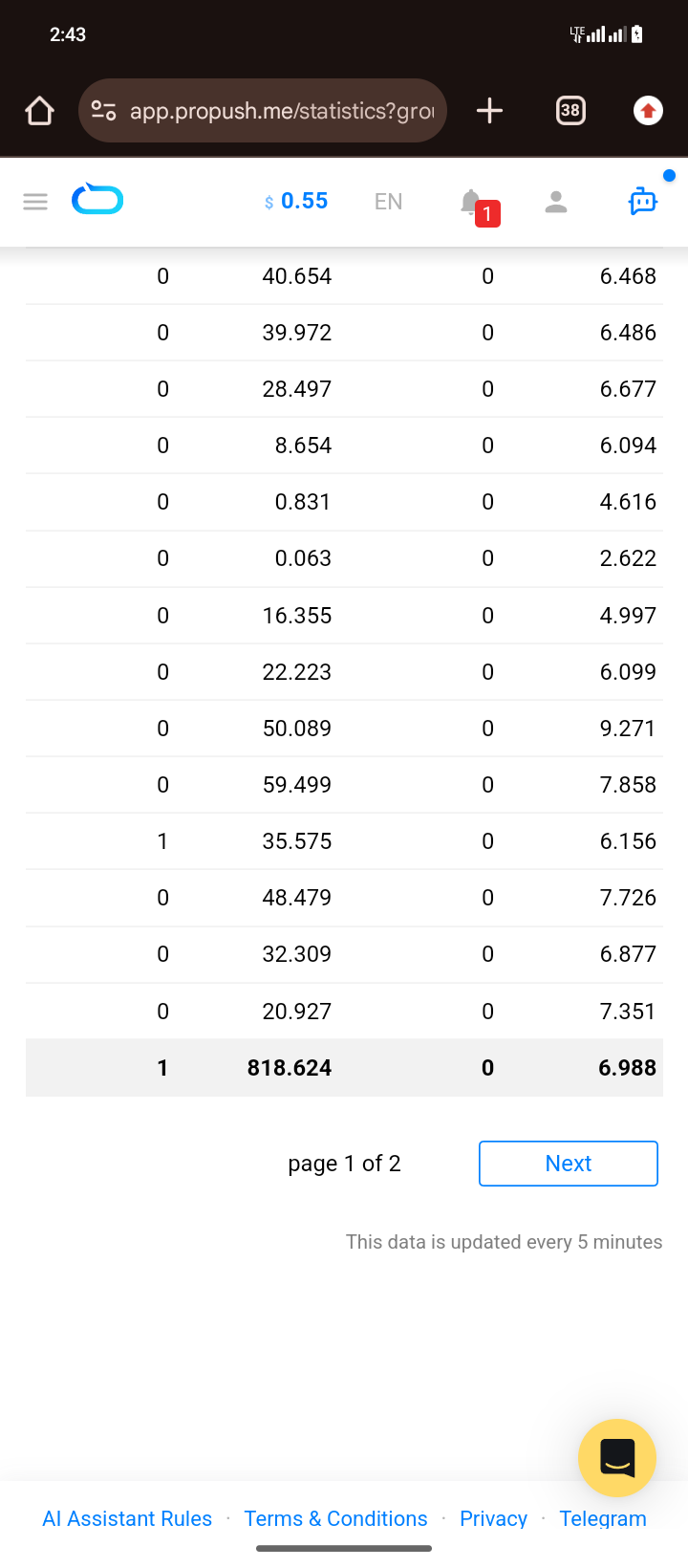
The economics of the run:
For campaigns that started at just $3 a day, $1,581 over three months is a pretty solid result. More than half of it came in June, when the setup was already running at its best.
So, what did 3 months of testing and $1,581 in earnings teach him? Let’s hear it from the publisher himself.
1. Start small
"I learned that there is no need to spend heavily before understanding whether a campaign has potential. Starting with a small testing budget allowed me to collect data without taking unnecessary risks."
2. GEO selection matters
"Not every GEO performed equally. Mozambique and Rwanda stood out as some of the strongest GEOs for my campaigns, which taught me the importance of testing multiple countries instead of assuming that one GEO will work for every campaign."
3. Creative testing is critical
"The creative is one of the most important parts of Facebook traffic. A campaign can have a good offer, but if the creative doesn't generate enough curiosity or clicks, the traffic will not be sufficient. Testing different creative angles helped me find better-performing combinations."
4. Don't scale too early
"A campaign showing promising results with a small budget does not automatically mean it is ready for aggressive scaling. I preferred to collect enough data first, identify stronger ad sets, and then increase the budget progressively."
5. Successful campaigns can lead to new tests
"When I found an ad set performing well, I didn't simply leave it running. I tried to look for ideal audiences by duplicating an already performing ad set."
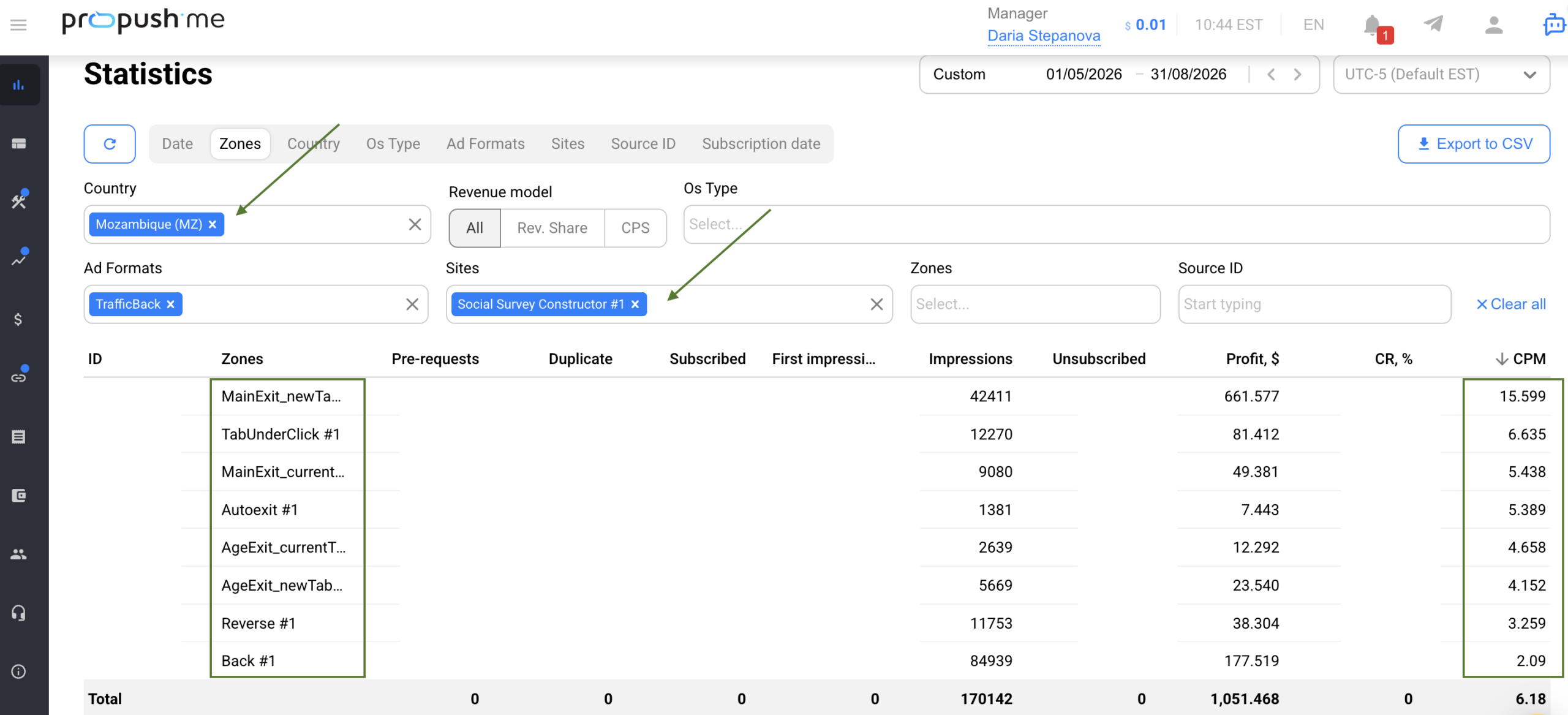
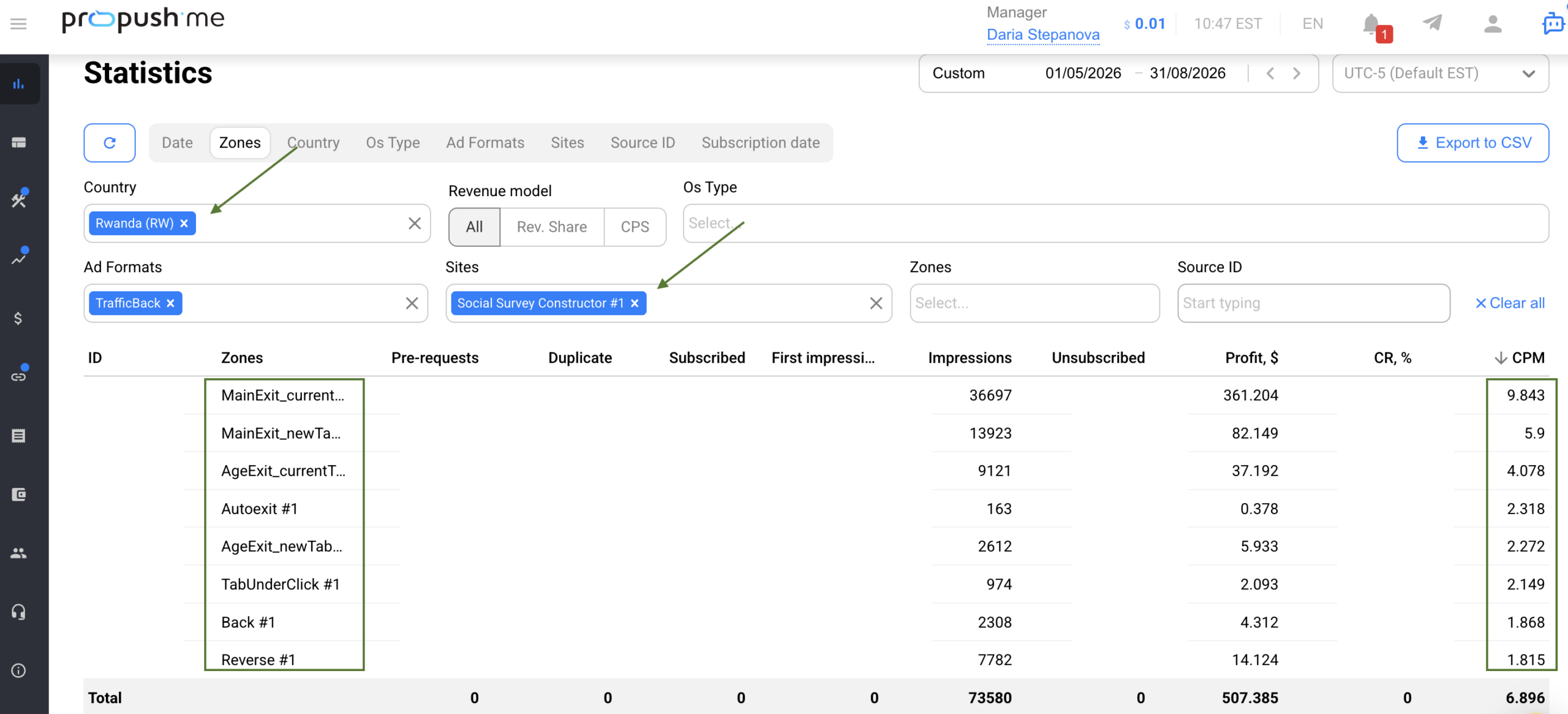
Check CPM by GEO and monetization zone, not just overall. June’s CPM was $6.988, compared to the $6.087 average, and a difference like that can change whether your CPR target still makes sense. When scaling a GEO, use that GEO’s numbers as your benchmark.
Apart from GEO, it’s important to remember that Constructor monetizes traffic across several zones, each corresponding to a different stage of user engagement. Main Exit represents the highest level of engagement, so its CPM will often be higher. Other monetization zones may show lower CPMs, which is completely normal.
In other words, check the Constructor exit breakdown, not just the overall funnel performance. The distribution across different exits gives you a much clearer picture of how the funnel actually worked: where users dropped off, which paths generated the most value, and whether one particular exit significantly outperformed the others.
Customize before you write a template off. Constructor templates are editable, and sometimes a few wording changes are enough to turn a weak landing page around. It’s one of the quickest and cheapest ways to see whether the flow is wrong for your traffic, or simply speaking the wrong language.
ProPush AI Assistant makes adjusting landing page copy and design even faster. You can use a simple chat to update copy, images, colors, CTAs, and other page elements, adapt the landing to a specific GEO, and create multiple versions for testing – without editing the code.
Was this publisher’s success down to luck?
Not really. He had a clear strategy and followed it to a T: starting at a low daily budget, giving promising ad sets enough time to prove themselves, watching the CPR closely, and scaling only when the numbers made sense.
For other publishers, the takeaway isn’t to copy Mozambique and Rwanda, chase an 18% CTR, or use $0.00323 as a universal CPR target. Those numbers belong to this campaign. What’s worth borrowing is the process: start small, find the benchmarks that make your own traffic profitable, and scale only after the results hold.
Want to try a similar setup? Open the Constructor in your ProPush account, choose a flow that fits your traffic, customize it, and start with a small test. If you’d like to see what the same tool can do with a much bigger budget, check out our earlier Constructor case study.
Big thanks to the publisher who shared his data, his creatives, and his reasoning for this case study.
Have you ever had an idea for how to improve a landing page, but didn't have the time to pull it off, or it just felt too complicated?
We've all been there.
So what do we, at ProPush, say to that?
Not on our watch!
Meet our newest AI Assistant for ProPush Constructor – the one that's about to level up your landing page game like never before.
Want to know how it works, how to get your very own assistant, and what you can make it do?
Read on.
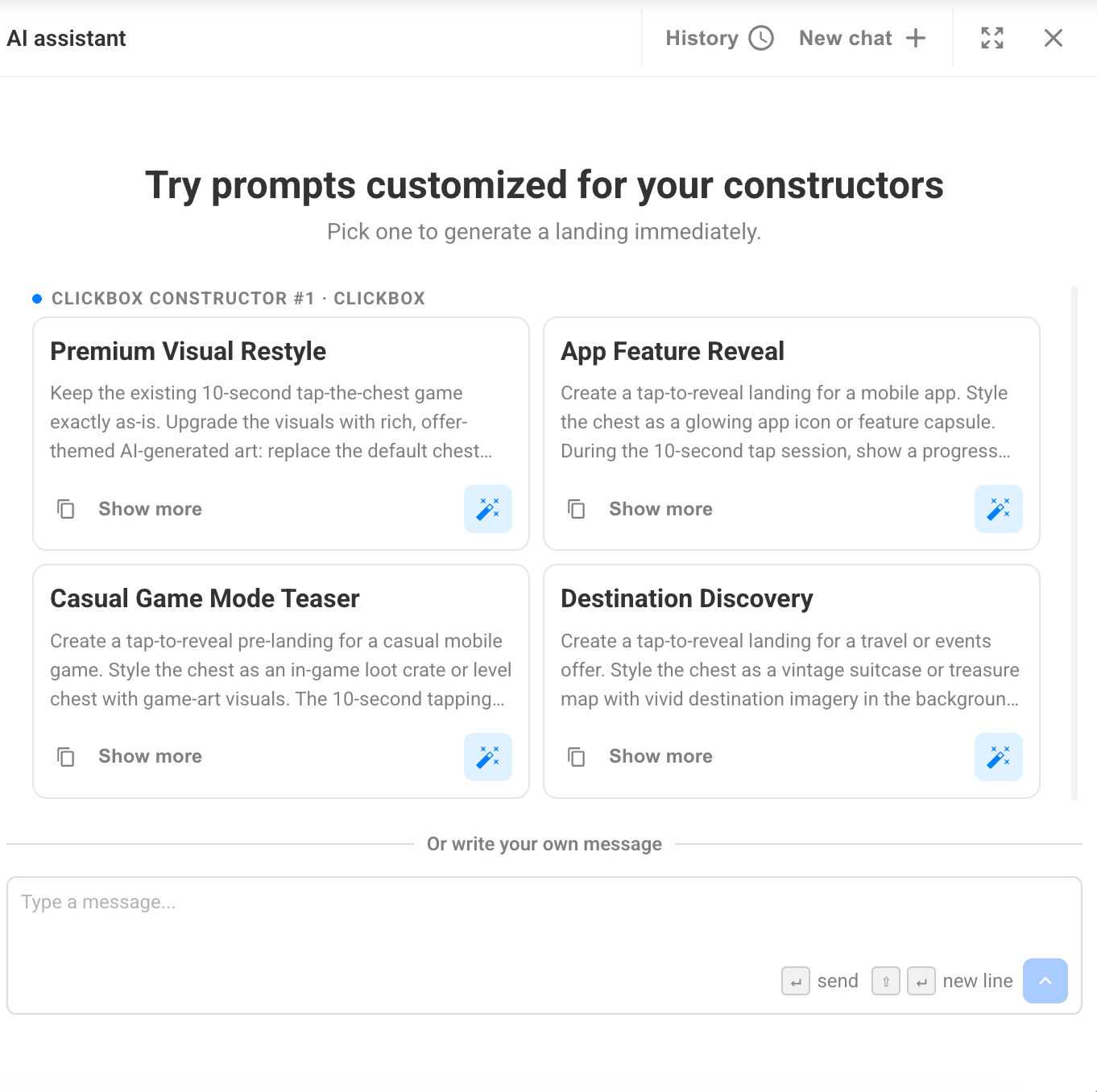
The AI Assistant is your personal, built-in helper that creates and customizes landing pages through a simple chat.
Essentially, it frees you from the burden of manually editing texts and images, and you can play around with colors and every other page element, too.
Remember digging through the code, accidentally deleting something important, and breaking the whole thing? Yeah, those days are finally over [*heavy sigh of relief]. The AI Assistant doesn't just save you from doing it all by hand; it removes the need to even know how. No coding skills, no layout know-how, no fear of breaking stuff.
Your AI Assistant won't roll its eyes; it'll just make sure you end up with a landing page that matches your goals, looks great, and converts non-stop.
All you need to do is literally describe what you want and how you want it, right in the chat. Yep, kind of vibe-coding 😀
The AI Assistant will suggest options and help you adapt the landing page to your needs and requirements.
And our skilled AI Assistant works hand in hand with everything Constructor already offers – ready-made monetization landing pages and proven user flows. So instead of building a page from scratch, you can grab a Constructor template that already works (and has a solid track record of conversions) and quickly tailor it to your audience and traffic source.
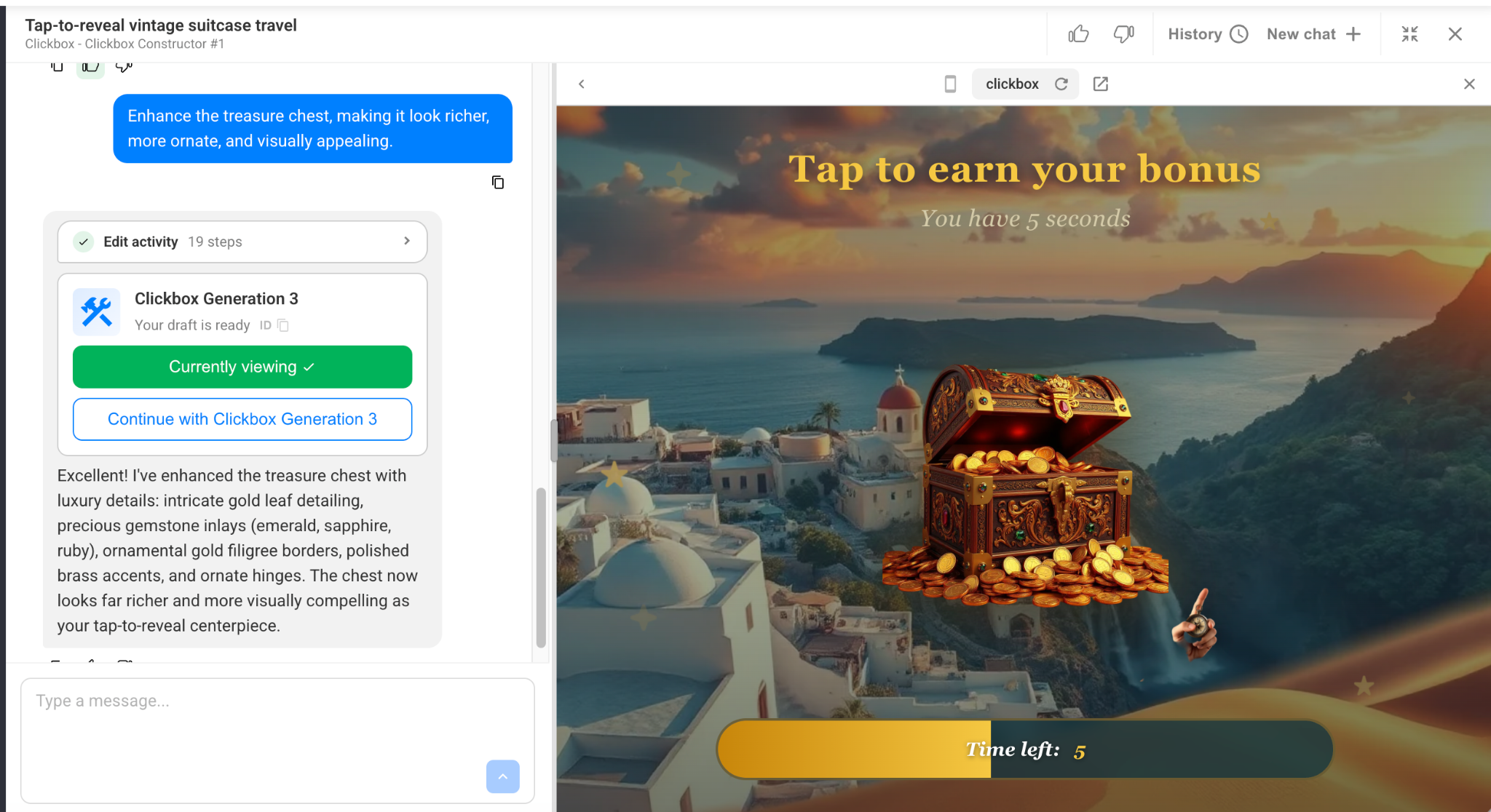



All of these variations were created within a single chat — literally with just 4 short sentences and a few minutes of waiting.
So, here's what it can do:
And the best part? Once you get the final version, you can still fine-tune it manually or export it whenever you're ready.
Ready to see why this is such a big deal? Here are 5 very good reasons to give the AI Assistant a try.
Polishing creatives eats up tonnes of time – time you could be spending in far more useful ways.
That's exactly why the AI Assistant takes this off your plate, helping you create and update landing pages in minutes instead of hours. No more manually editing dozens of page elements one by one.
Got a paid GPT or Claude account? Save those tokens for your research tasks. With the AI Assistant, you can finally forget about:
It's all already built into ProPush. And here's the kicker: our AI Assistant is trained on proven monetization templates and knows the platform's policy inside out – something universal AI tools just can't do!
And here's something external AI tools can't pull off: when you ask ChatGPT or Claude to rework a lander, it does it in a vacuum, handing you a chunk of code that's totally detached from your monetization setup.
Then it's on you to glue that AI-generated page back into a previously downloaded archive, and pray nothing falls apart in the process. Spoiler: stuff usually does.
With our AI Assistant, it's mistake-proof. Every new landing page gets packed into a nice, ready archive with the full monetization template baked in from the start. No "why is this broken now?" moments – we handle all of that.
The flow is dead simple: generate >> download the update >> integrate it on your domain >> send traffic >> make money.
We like things being easy, and we figured you do too.
Let's skip the part where you try to figure out the perfect prompt: "Imagine you are an experienced affiliate designer…"
Your AI Assistant understands plain, normal language and helps you get exactly what you need – no extra hacker skills or complicated prompts involved.
When it comes to testing, faster is always better.
Whip up multiple versions of texts, images, and designs in no time, so you can quickly find the option that performs best.
Does AI scare you because it all seems too complicated?
Good news: even with zero experience in design, copywriting, or working with AI, you can still create and customize landing pages with ease.
So, whether you want to save time, cut extra AI costs, skip the prompt-engineering headache, test faster, or just get started with zero experience – the AI Assistant has your back. Less hassle, more landing pages, more revenue. What's not to love?
Well, any way you like!
Speak in your native language, so nothing holds you back, and express yourself however feels right.
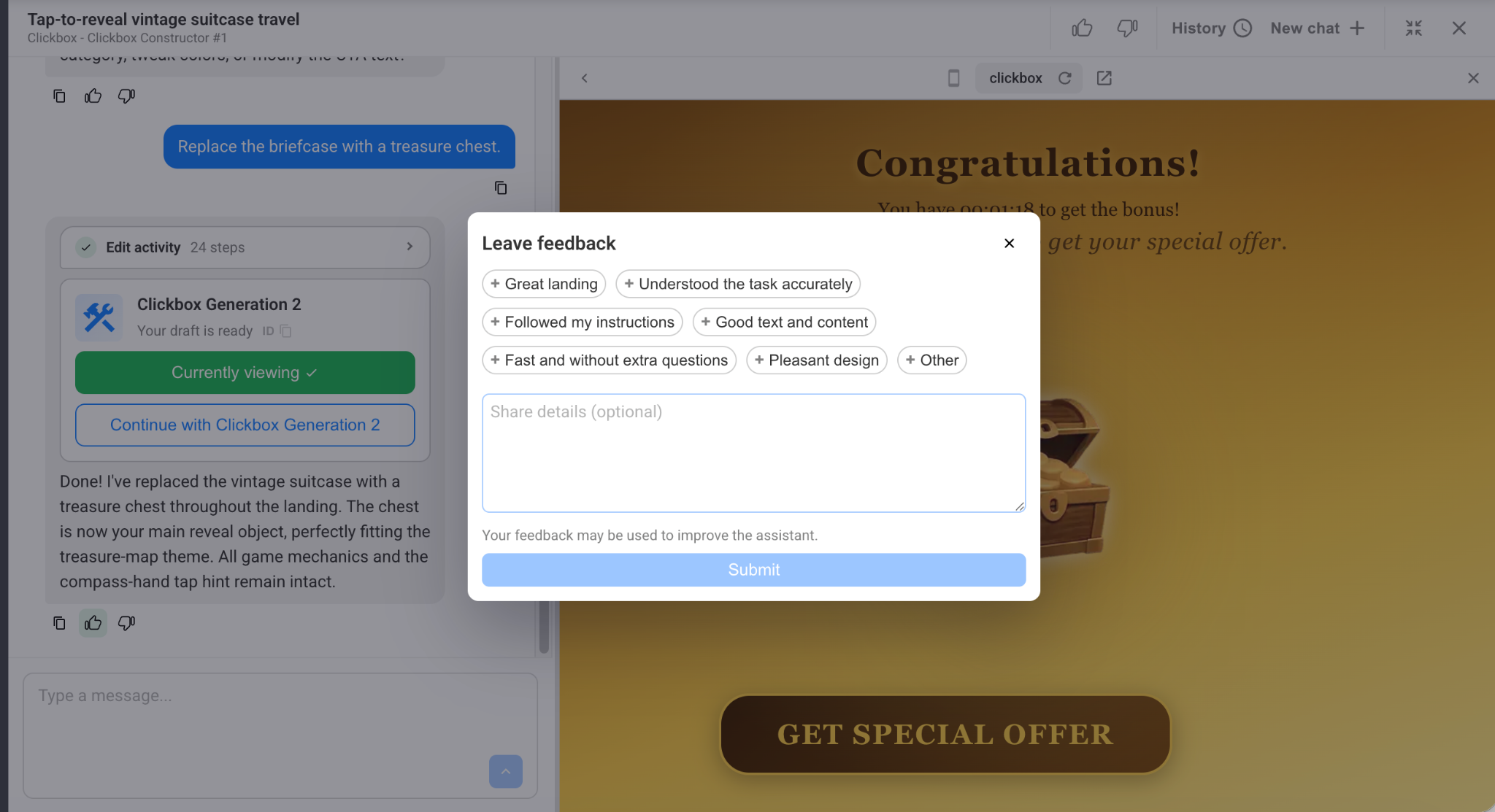
Every chat message comes with two buttons: 👍 and 👎 – they're there so you can rate your helper's work and, most importantly, leave a comment for the assistant to learn from. That means with every chat, your AI Assistant gets a little smarter and more capable.
Our AI Assistant is a good boy and works in full accordance with our policy rules.
So if you happen to request something that doesn't quite fit our policy, your little helper will step in and suggest alternative options – ones that stay as close as possible to your original idea while still playing by the platform's rules.
It’s already on our platform! The AI Assistant is available to all Constructor users.
Here’s how to get access to yours:
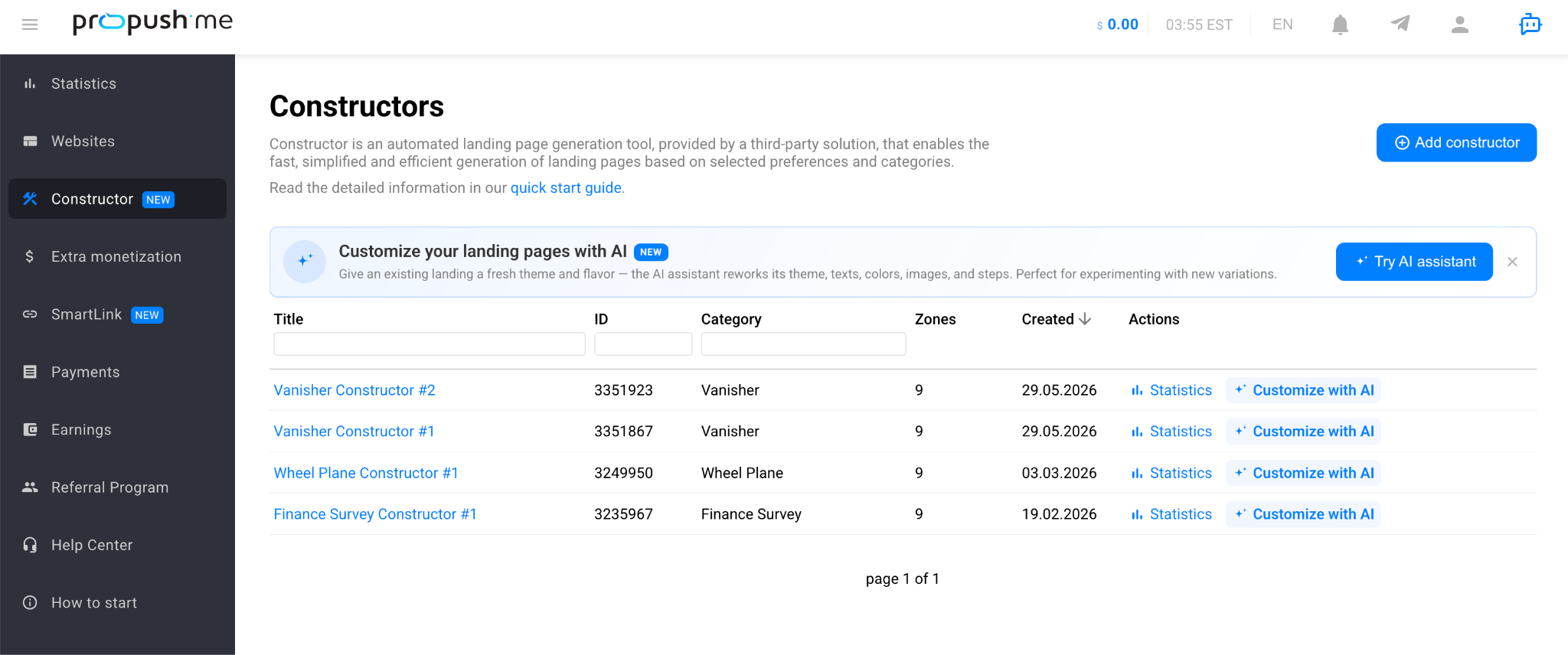
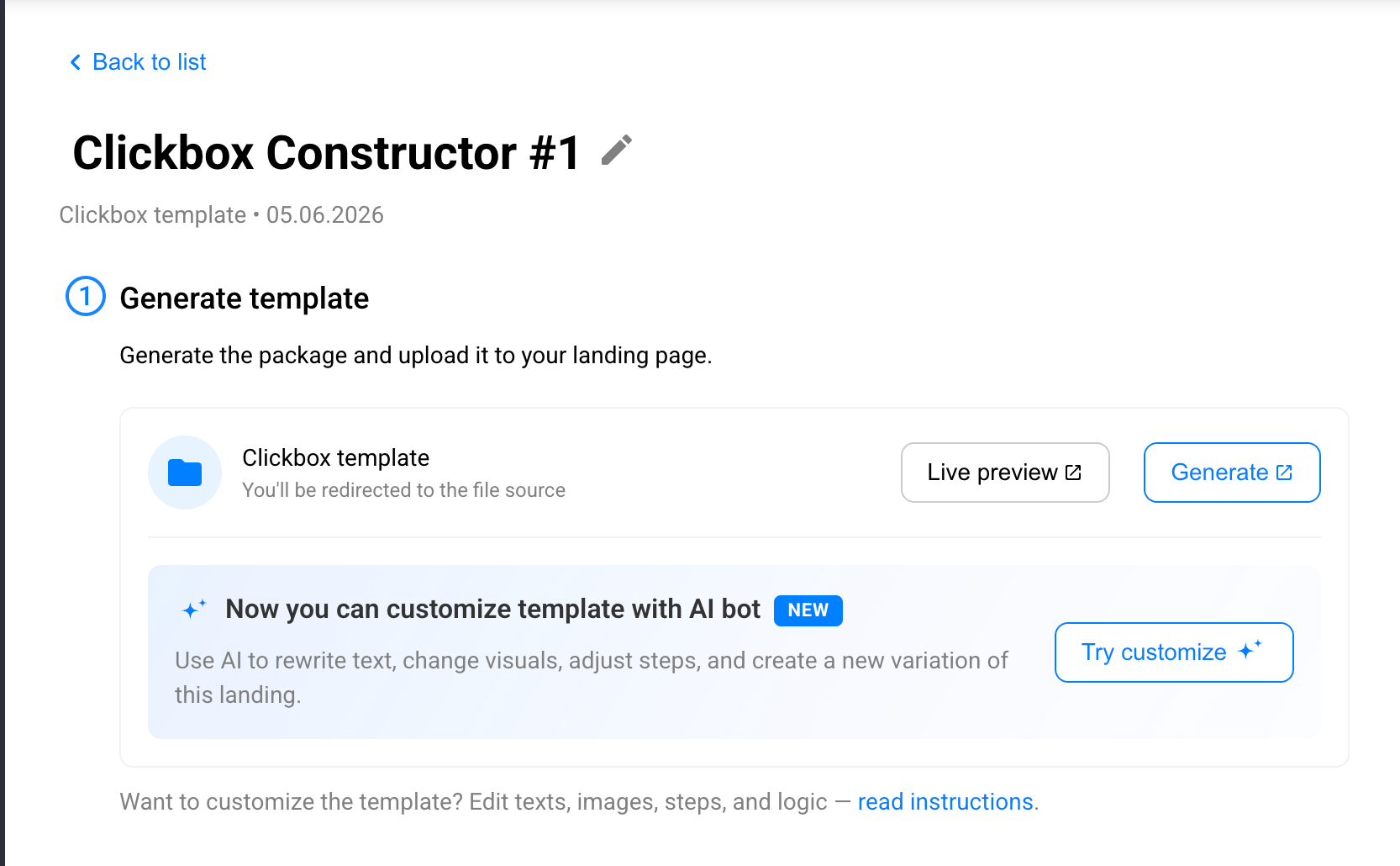
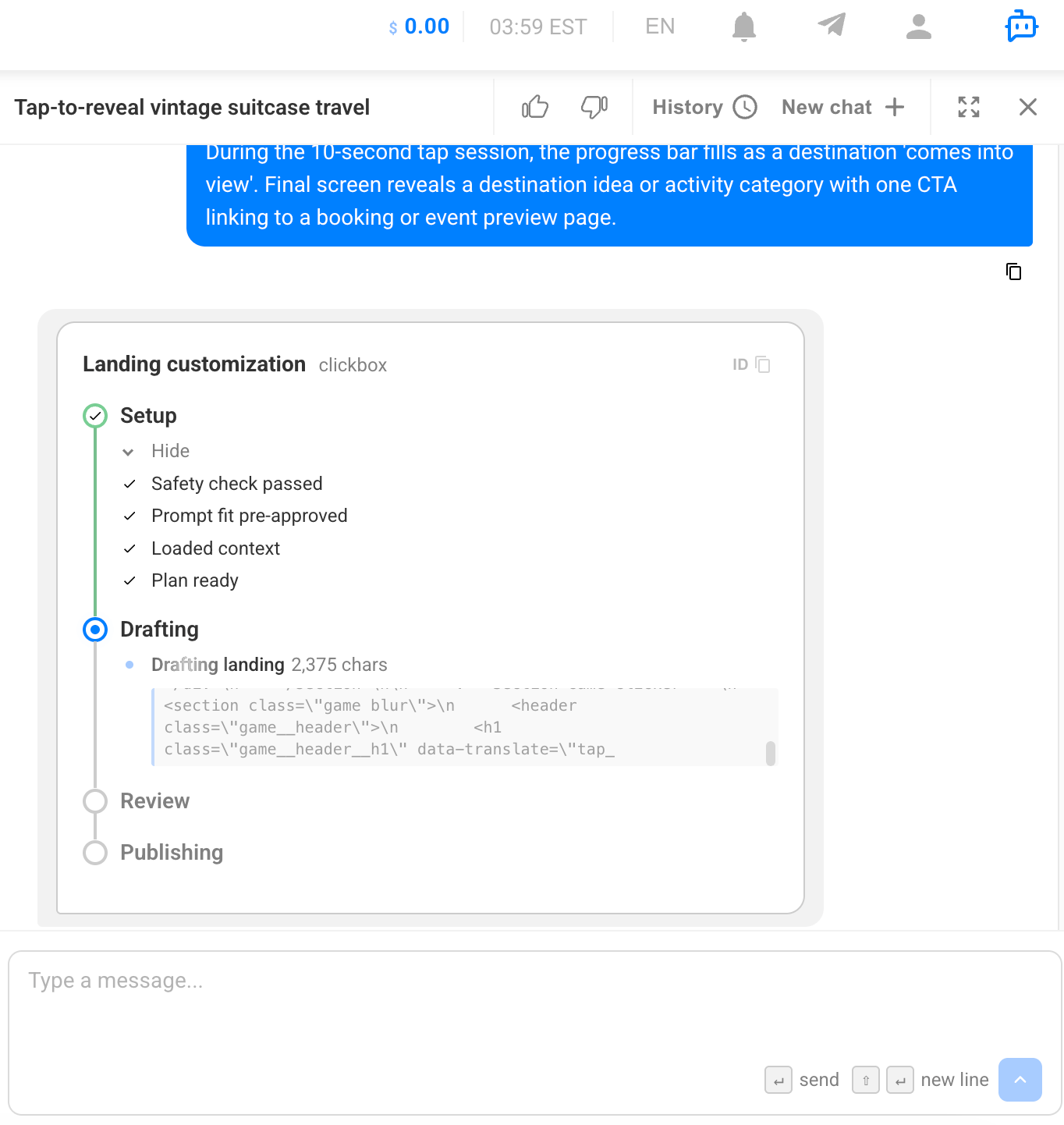
Please note: access to Constructor and the AI Assistant can be revoked. For example, if our policy rules are violated or the tool sits unused for a long time.
This is just the beginning. Down the road, the AI Assistant is set to become a full-on control center for your account: a single chat where you can manage your sites, ads, and stats just by talking to it – no diving into the platform, no clicking through endless buttons.
Your new AI Assistant takes the heavy lifting out of building landing pages. This way, you can focus on what really matters: strategy, scaling, and decisions.
So go ahead – say hello to your AI Assistant, describe your next big idea, and watch it come to life. Less hassle, more landing pages, more revenue. Let's get to it!
What if your next landing page was already tested and profitable before you even launched it?
Sounds like the perfect scenario for affiliates and publishers, right?
Good news – it’s now possible.
Meet Constructor – ready-made HTML templates from ProPush. They’re fully customizable, easy to host on your own server, and designed to maximize both performance and revenue.
Let’s take a closer look at why Constructor can become a powerful tool for affiliates and publishers.
Constructor is a monetization tool built around pre-tested landing page templates delivered as a downloadable archive.
Inside the archive, you’ll find all the files required to customize the template: edit the design, adjust the structure, and fine-tune the pages to match your traffic and monetization strategy.
After generating and downloading the archive, you can host the template on your own server and customize it based on your traffic sources and revenue goals.
Each template already includes a tested user flow. Depending on your funnel structure, you can use longer engagement-focused experiences or shorter conversion-driven formats.
One of Constructor’s key advantages is its built-in monetization architecture. Every page includes up to nine monetization zones, combining redirect scenarios triggered by different user behavior patterns and classic push notifications.
All monetization elements work together through a smart ad rotation engine designed to maximize revenue from every user interaction.
If you prefer to start simple, you can launch the default template version first. It’s fully functional, ready to run, and provides a smooth entry point for working with Constructor.
Now, let’s explore what benefits Constructor can offer to you.
Many advertisers and brands provide ready-made creatives. However, they’re rarely optimized with your revenue goals in mind.
In most cases, you get limited flexibility, little control over user flow, minimal testing opportunities, and almost no room for layered monetization.
You bring the traffic, but you don’t control the outcome.
Constructor changes that.
Let’s see how it addresses these challenges and gives you more control over your monetization strategy.
With Constructor, you’re no longer limited by someone else’s setup.
You host the template yourself, customize every element, adjust the funnel structure, test different logic, and scale the approaches that perform best.
One template doesn’t have to mean just one revenue stream.
Constructor allows you to combine multiple user actions within a single funnel and monetize traffic at several interaction points.
When a user clicks anywhere on the page, a popunder opens in a new tab.
Additional revenue can be generated when a user interacts with push notifications.
Traffic can also be monetized when a user exits the page or does not match certain conditions.
The monetization logic is flexible. You can manage it directly through the interface or modify it at the code level if deeper customization is required.
There is also a core set of required user actions that keeps the funnel functioning correctly, along with optional monetization layers such as push notifications.
Technically, you can disable certain elements if needed. However, we recommend starting with the full configuration, as it’s designed to deliver optimal revenue performance. Removing too many components may naturally reduce results.
With Constructor, even if a user doesn’t convert on the primary action, additional monetization layers help extract more value from the same traffic.
Each monetization zone can be tracked independently.
This allows you to clearly see which parts of the funnel perform best, where improvements are needed, and where the main revenue is generated.
Inside the ProPush platform, you get detailed zone-level statistics in a convenient interface.
For more advanced analytics, you can also retrieve performance data via API and integrate it into your own reporting system.
If you use external trackers, flexible postback settings allow you to pass all necessary data and analyze campaign performance within your existing tracking stack.
Why run just one funnel when you can test multiple variations?
With Constructor, you can create an unlimited number of funnels per day, allowing you to experiment with different angles, adapt to various GEOs, and quickly respond to traffic trends.
Constructor templates are already structured with traffic specifics in mind, based on what typically performs best.
This means you start with frameworks that are already optimized and tested.
At the same time, you maintain full flexibility. You can adapt the structure to your offer, refine it for your traffic sources, and tailor it to the behavior of your audience.
Getting started with Constructor is straightforward.
A quick overview of how to get started with ProPush Constructor.
Log in to your ProPush account and open the Constructor section.
Submit a request and describe your traffic and goals. Detailed answers help the team review and approve access faster.
You may also be asked to pass a traffic quality check as part of the approval process.
Select a ready-made HTML template built around a proven offer funnel.
Download the archive and host the template on your server. The default version is fully functional and can be launched immediately.
You can start sending traffic right away and analyze the performance before making any changes.
Once you’re ready to optimize, you can customize the text, visuals, and structure of the template. All files are included in the archive, and technical documentation is provided to guide you through the process.
Constructor offers full flexibility, but it’s often best to begin with the tested default setup, validate your traffic, and only then gradually refine the funnel.
Over-customizing too early may impact performance, while the default configuration is already structured to convert.
Quick fact: Constructor supports multiple verticals and has already helped publishers increase revenue by up to +45%*.
*Based on aggregated internal testing across multiple verticals and traffic types.
Constructor is not just a collection of templates.
It’s a complete monetization framework that allows you to control your funnel, launch faster, and build flows designed to perform from day one.
Instead of relying on a single payout, you create a system where multiple user interactions contribute to overall revenue.
With monetization built directly into the user journey, your traffic is optimized not only to convert — but to perform consistently.
Ready to build your own flow?